Master Hermes Agent. End to end.
A complete docs-style learning experience for the self-improving AI agent built by Nous Research. From zero install to running it like a professional.

01Welcome
Hermes Agent is not a chat app. It is an autonomous AI agent that learns, remembers, and operates wherever you put it — a laptop, a $5 VPS, a serverless container, your Telegram inbox.
You may have seen it labelled Poseidon Agent. Poseidon is a visual skin on top of Hermes — same engine, same commands, same configuration, same skills. Anything you learn here applies to both. Throughout this guide we call it Hermes.
This guide is written for someone who has used Claude or ChatGPT before but never installed a real agent on their own machine. Every term that might be new is explained on first use. You can also flip to the glossary anytime via the sidebar.
Finish this guide and you will be able to install Hermes on a fresh machine, connect it to any model, give it tools, teach it skills, hook it up to messaging platforms, schedule it, and debug it when something breaks. No magic. Just the actual mechanics.
02What is Hermes Agent?
An autonomous AI agent. Not a chatbot, not a plugin, not a coding copilot. Something different in kind.
Most AI tools you have used are assistants — they wait for you to type, they answer, they wait again. Hermes is an agent. You give it a goal. It plans. It uses tools. It hits errors and figures out workarounds. It comes back when the job is done, or it asks you a question if it genuinely cannot decide.
What makes it different
- It learns. Every session feeds a memory store. Useful patterns become skills. Skills get refined automatically by a background process called the Curator.
- It lives outside your laptop. Same Hermes runs on a phone via Telegram, on a server, in a Docker container, on a serverless platform. One agent, many surfaces.
- It is open. The full source is on GitHub. The skill format is an open standard. You can run it offline against a local model if you want.
- It is fast. Tool calls happen in milliseconds. You feel the difference within a session — no lag between deciding to act and the action happening.
Who built it
Nous Research. The same team behind the Hermes language model series, Nomos, and Psyche. They train models for a living, so the agent's prompting, tool design, and memory handling come from people who know how language models actually behave under load.
03Poseidon vs Hermes — what's the difference?
A common point of confusion. The short answer: Poseidon is a skin. Hermes is the engine.
The big POSEIDON-AGENT banner you see in the terminal is one of several available themes the project ships. Underneath, it is the same Hermes engine, same commands, same configuration, same skills. Change the skin with /skin. That is the only difference.
Other skin options include hermes, minimal, and several themed variants. Try a few to find one you like:
/skin           # show current skin
/skin poseidon  # cinematic ocean theme
/skin hermes    # default brand
/skin minimal # strip the banner04Glossary
Every term that appears later. Read once, refer back any time.
| Term | Meaning |
|---|---|
| Agent | A program that takes a goal, plans steps, uses tools, and acts without you holding its hand at every step. |
| Model | The language model doing the thinking. GPT-5, Claude Sonnet 4.6, Grok 4, Llama, Qwen, etc. |
| Provider | The company hosting the model. OpenAI, Anthropic, Nous Portal, OpenRouter, x.ai, a local Ollama install. |
| Tool | A capability the agent can call — read a file, click a button, send a message, run a shell command. |
| Toolset | A bundle of related tools. The browser toolset includes browser_click, browser_back, browser_dialog, etc. |
| Skill | A reusable procedure stored as a markdown file. Knows when to trigger and what steps to run. Procedural memory. |
| MCP | Model Context Protocol. An open standard for plugging external tools into AI agents. Hermes speaks MCP. |
| Gateway | The Hermes process that talks to messaging platforms (Telegram, Discord, Slack). Runs in the background. |
| Channel | A specific chat — a Telegram DM, a Discord channel, a Slack thread. |
| Session | One conversation. Has an ID, a title, a history. You can resume one any time. |
| Profile | An entire separate Hermes installation. Different config, different memory, different skills. |
| Cron | A scheduler. Tells Hermes to run a task at a recurring time. |
| Kanban | A built-in board for tracking multi-step or parallel work. |
| Memory | The agent's long-term recall. Stored in SQLite with FTS5 full-text search. |
| SOUL.md | A file that defines the agent's personality, voice, style. Always loaded. |
| Curator | A background process that grooms skills — improves them, deduplicates, archives unused ones. |
| YOLO mode | Skip all confirmation prompts for dangerous commands. For brave people only. |
| Subagent | A child agent spawned by Hermes for parallel work. |
05Prerequisites
The shortest possible list. The installer handles almost everything.
All platforms — one requirement
Git. Run git --version. If you see a version number, you are ready. If not:
- macOS — open Terminal and run
xcode-select --install - Linux —
sudo apt install git/sudo dnf install git/sudo pacman -S git - Windows — the Hermes installer ships portable Git automatically
What the installer handles for you
| Dependency | What it does |
|---|---|
| uv | Fast Python package manager. |
| Python 3.11 | The runtime Hermes is written in. |
| Node.js 22 | Browser automation, WhatsApp bridge. |
| ripgrep | Fast file search. |
| ffmpeg | Audio format conversion for TTS. |
| Playwright | Browser automation framework. |
Disk space
Plan for around 1.5 GB for install (Python venv, Node modules, Chromium). The data directory grows from there as you use it.
06Install on macOS & Linux
One command. 60 to 120 seconds.
The one-liner
curl -fsSL https://raw.githubusercontent.com/NousResearch/hermes-agent/main/scripts/install.sh | bashWhat just happened
- The installer detected your OS (macOS or Linux)
- It cloned the Hermes repo to
~/.hermes/hermes-agent/ - It used
uvto install Python 3.11 into a private virtualenv - It installed Node.js, ripgrep, and ffmpeg if needed
- It downloaded Chromium for the browser tool
- It placed a launcher at
~/.local/bin/hermesand added it to your PATH
Reload your shell
source ~/.zshrc    # macOS default + most Linux
source ~/.bashrc   # Ubuntu/Debian default
Verify the install
hermes --version
hermes doctor
--version prints the installed Hermes version. hermes doctor runs a system check.
First launch
hermesThis drops you into the TUI — the terminal user interface. On first launch, Hermes walks you through choosing a model provider.
Where things live
| Path | What it holds |
|---|---|
~/.hermes/hermes-agent/ | The cloned source code. Updated when you run hermes update. |
~/.hermes/ | Your data — config, sessions, skills, memory, logs. |
~/.hermes/.env | API keys and secrets. Permissions are 600. |
~/.hermes/config.yaml | Main configuration file. |
~/.local/bin/hermes | The launcher script. |
07Install on Windows & Android
Native Windows is early beta. The smoothest Windows path is still WSL2.
Windows — WSL2 (recommended)
- Open PowerShell as administrator
- Run
wsl --install— installs Ubuntu by default - Restart your computer when prompted
- Open the new Ubuntu app, create Linux username/password
- Run the macOS/Linux one-liner from the previous page inside Ubuntu
Windows — native PowerShell (early beta)
iex (irm https://raw.githubusercontent.com/NousResearch/hermes-agent/main/scripts/install.ps1)The native installer handles Python, Node.js, ripgrep, ffmpeg, and a portable Git that won't conflict with any existing Git install. Code lands at %LOCALAPPDATA%\hermes\hermes-agent\. The hermes command is added to your user PATH. Restart your terminal after install.
Android via Termux
Install Termux from F-Droid (Play Store version is outdated). Open Termux. Run:
curl -fsSL https://raw.githubusercontent.com/NousResearch/hermes-agent/main/scripts/install.sh | bashThe installer detects Termux automatically. It uses Termux's pkg manager and skips the browser bootstrap by default.
A common pattern: install Hermes on a small VPS ($5/month). Connect it to your Telegram. Now you have a full agent in your pocket without anything running on your phone.
08Your first launch
What happens after you type hermes for the first time.
The setup wizard
First launch triggers hermes setup automatically. It asks four things:
- Which model provider — Nous Portal (recommended), OpenRouter, OpenAI, Anthropic, x.ai, or custom endpoint
- Your API key — saved to
~/.hermes/.envwith mode 600 - Which model — fetched from the chosen provider
- Which tools — default selection is fine
The Nous Portal shortcut
hermes setup --portalOne subscription, 300+ models, plus the Tool Gateway (web search, image gen, TTS, cloud browser). Recommended for beginners.
Reconfiguring later
| Command | What it does |
|---|---|
hermes setup | Re-run the full wizard. |
hermes model | Change provider or model only. |
hermes tools | Enable or disable tools. |
hermes gateway setup | Add messaging platforms. |
hermes doctor | Diagnose installation issues. |
hermes update | Pull the latest version. |
09The TUI explained
TUI = Terminal User Interface. The screen you see after typing hermes.
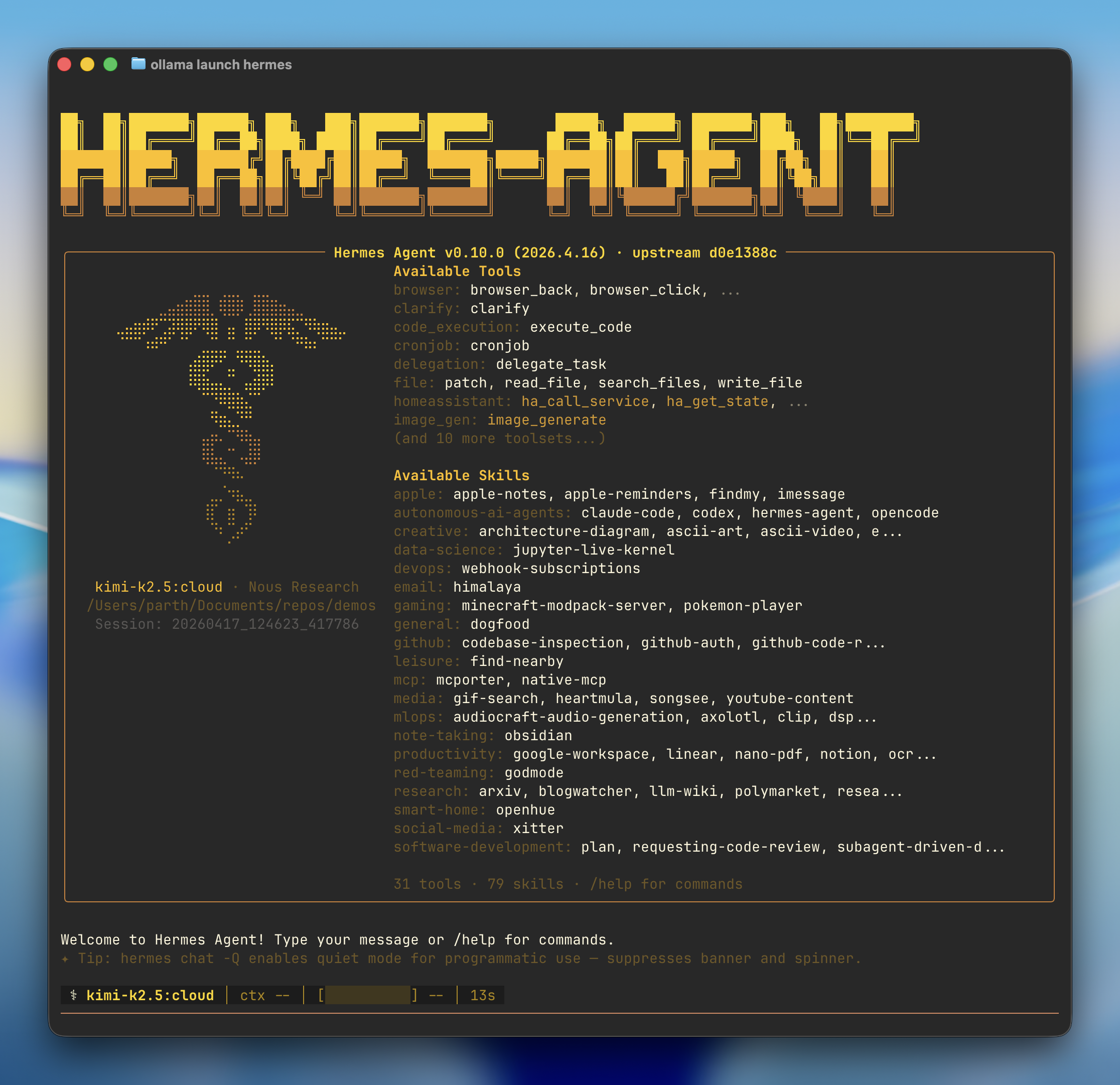
Top — the banner
The big ASCII wordmark (POSEIDON-AGENT by default). Purely cosmetic. Change with /skin.
Below the banner — the info panel
- Hermes Agent version — current version + upstream commit
- Available Tools — every tool Hermes can call this session
- Available Skills — every skill installed, grouped by category
- Tool + skill counts — e.g. "30 tools · 90 skills"
- Update warning — if behind on commits, you see an orange notice
Bottom — the status bar
| Field | Meaning |
|---|---|
gpt-5-mini | The model currently active. |
ctx — | Context usage percentage. |
[ ____ ] — | Progress bar for the current tool call. |
10m | How long the session has been open. |
0s | Time since the last activity. |
The input box
At the very bottom. You type here. Type / to open an autocomplete menu of all available slash commands. Press Enter to submit. Press Ctrl+C to interrupt the running agent.
If the TUI drifts after a terminal resize or a mouse selection, type /redraw to force a full repaint.
10Choosing a provider
Hermes is provider-agnostic. You bring the brain; it provides everything else.
| Provider | Strength | Setup |
|---|---|---|
| Nous Portal | 300+ models from every major provider, one subscription, plus Tool Gateway. | hermes setup --portal |
| Anthropic | Best for reasoning, code, long context. Sonnet 4.6 is the workhorse. | console.anthropic.com → key → hermes model |
| OpenAI | Best for general tasks and image gen. GPT-5 family. | platform.openai.com → key |
| x.ai | Grok 4. Real-time info via X integration. | x.ai → key |
| OpenRouter | One key, hundreds of models. Pay per token. | openrouter.ai → key |
| Google Gemini | Gemini Pro 3, free Code Assist quota. | aistudio.google.com → key |
| Ollama (local) | Run Llama, Qwen, Mistral locally. No API costs. | install Ollama → hermes model → custom: http://localhost:11434/v1 |
Switching mid-session
/model claude-sonnet-4
/model anthropic:claude-opus-4
/model x-ai:grok-4
/model custom:qwen3-coder:30b
Session-only by default. Add --global to persist to config.yaml. To add a brand-new provider, exit the TUI and run hermes model.
11Nous Portal — the fastest path
One subscription covers everything. Recommended unless you have a reason to pick a single provider directly.
Nous Portal is Nous Research's own model gateway. One auth, 300+ models from every provider in one API. Plus the Tool Gateway — built-in web search, image generation, TTS, and cloud browser tools you'd otherwise pay for separately.
hermes setup --portalWhat's bundled
- Every major frontier model (GPT-5, Claude, Gemini, Grok)
- Open-source models (Llama, Qwen, Mistral)
- Nous Research's own Hermes and Nomos families
- Web search, image generation, TTS, cloud browser
- Unified billing — one dashboard for all model usage
12Model aliases — pick names you'll remember
Stop typing long model strings. Define your own short names.
hermes config set model.aliases.fav anthropic/claude-opus-4
hermes config set model.aliases.grok x-ai/grok-4
hermes config set model.aliases.fast openai/gpt-5-mini
Then in chat: /model fav, /model grok, /model fast.
You can also edit ~/.hermes/config.yaml directly:
model_aliases:
  fav:
    model: claude-sonnet-4.6
    provider: anthropic
  grok:
    model: grok-4
    provider: x-ai
  ollama-qwen:
    model: qwen3-coder:30b
    provider: custom
base_url: http://localhost:11434/v113Session commands
Type / in the input box to open the autocomplete menu. Built-in commands are case-insensitive.
| Command | Description |
|---|---|
/new [name] | Start a fresh session. Optional name sets the title. Append now, --yes, or -y to skip confirmation. |
/reset | Alias for /new. |
/clear | Clear the screen and start a new session. |
/history | Show the full conversation history. |
/save | Save the current conversation. Hermes also autosaves. |
/retry | Re-send the last message. |
/undo | Remove the last user + assistant exchange. |
/compress [focus] | Manually compress conversation context. |
/queue <prompt> | Queue a prompt for the next turn without interrupting. |
/steer <prompt> | Inject a mid-run note that arrives after the next tool call. |
/goal <text> | Set a standing goal Hermes works toward across turns. A judge model checks after each turn; if not done, Hermes auto-continues. |
/subgoal <text> | Add a sub-criterion to the active goal. |
/resume [name] | Resume a previously-named session. |
/sessions | Interactive picker for past sessions. |
/status | Show session info — model, provider, tokens, agent state. |
/background <prompt> | Run a prompt in a separate background session. |
/branch [name] | Branch the current session to explore a different path. |
/handoff <platform> | Hand the current CLI session off to Telegram, Discord, Slack, WhatsApp, Signal, Matrix. |
/stop | Kill all running background processes. |
/goal is the single most powerful command. Set a goal once, the agent continues across turns until the judge model says it's done. Up to 20 turns of autonomous work per goal by default.
14Configuration commands
Tune the agent's behaviour, voice, model, and display in-session.
| Command | Description |
|---|---|
/config | Show the current configuration. |
/model [name] | Show or change the model. Supports provider switches, aliases. |
/personality | Set or switch a predefined personality overlay. |
/verbose | Cycle tool progress display: off → new → all → verbose. |
/fast | Toggle fast mode (OpenAI Priority / Anthropic Fast Mode). |
/reasoning | Manage reasoning effort and display. |
/skin | Show or change display theme (Poseidon, Hermes, etc). |
/statusbar | Toggle bottom status bar. |
/voice | Toggle voice mode and spoken playback. |
/yolo | Toggle YOLO mode — skip all dangerous-command approval prompts. |
/footer | Toggle runtime-metadata footer. |
15Tools & skills commands
Control the capabilities Hermes has access to inside a session.
| Command | Description |
|---|---|
/tools | Manage tools — list, disable, enable. |
/toolsets | List available toolsets. |
/browser | Manage local Chromium browser via CDP — connect / disconnect / status. |
/skills | Search, install, inspect, or manage skills from online registries. |
/cron | Manage scheduled tasks — list, add, edit, pause, resume, run, remove. |
/curator | Background skill maintenance — status, run, pin, archive. |
/kanban <action> | Drive the multi-profile collaboration board. |
/reload-mcp | Reload MCP servers from config.yaml. |
/reload-skills | Re-scan ~/.hermes/skills/ for newly installed or removed skills. |
/reload | Reload .env variables — picks up new API keys without restart. |
16Info & exit commands
Diagnostics, attachments, exit.
| Command | Description |
|---|---|
/help | Show the in-session help menu. |
/usage | Show token usage, cost, duration, account limits. |
/insights | Show usage analytics for the last 30 days. |
/platforms | Show gateway / messaging platform status. |
/paste | Attach a clipboard image to the next prompt. |
/copy [n] | Copy the last assistant response to clipboard. |
/image <path> | Attach a local image file for the next prompt. |
/debug | Upload a debug report and get a shareable link. |
/profile | Show the active profile name and home directory. |
/quit | Exit the CLI. Alias /exit. Pass --delete to also remove the session. |
Messaging-only commands
| Command | Description |
|---|---|
/sethome | Mark the current chat as home channel for deliveries. |
/topic | Telegram DM only. Manage multi-session topic mode. |
/commands | Browse all commands and skills (paginated). |
/approve | Approve a pending dangerous command (session or always). |
/deny | Reject a pending dangerous command. |
/update | Update Hermes to the latest version. |
/restart | Gracefully restart the gateway. |
17Tools — how they work
A tool is one thing the agent can do. Read a file. Click a button. Send a message. Run a shell command. There are 70+ built into Hermes.
Tools vs toolsets
A toolset is a named group of related tools. The browser toolset bundles browser_click, browser_back, browser_fill, etc. You enable or disable toolsets in hermes tools — every individual tool inside the set turns on or off together.
Common toolsets
browser
Click, type, navigate, scroll a real browser via Playwright.
browser-cdp
Lower-level Chrome DevTools Protocol access.
code_execution
Run Python, JavaScript, or shell code in a sandbox.
computer_use
Full GUI control — cursor, keyboard, screenshots.
cronjob
Create, list, edit scheduled tasks programmatically.
delegation
Spawn subagents for parallel work.
filesystem
Read, write, list, search files.
git
Stage, commit, diff, branch, push.
github
Issues, PRs, repos, releases via the GitHub API.
memory
Read and write to the cross-session memory store.
mcp
Bridge to any MCP server you have connected.
telegram
Send messages, files, polls to any registered Telegram chat.
terminal
Run arbitrary shell commands. Approval-gated.
vision
Analyse images — describe, OCR, locate elements.
web_search
Search the live web.
web_extract
Fetch and parse a webpage.
Enabling / disabling
hermes tools                  # interactive toggle UI
/tools disable browser-cdp    # turn off for the session
/tools enable computer_use # re-enable18Skills — the procedural layer
A skill is a reusable procedure stored as a markdown file. It knows when to trigger and what steps to run.
How skills differ from tools
Tools are atomic — one operation. Skills are recipes — a sequence of tool calls plus instructions on when to use them. A skill says "when the user asks for a viral tweet, gather these inputs, apply this template, return this format."
How they activate
Two ways. Implicitly — Hermes detects a trigger phrase in your message and loads the matching skill automatically. Explicitly — you type /skill-name.
The skill format
---
name: viral-tweet-generator
description: Generate viral X tweets using 9 patterns.
                Trigger: "viral tweet", "write a tweet".
metadata:
  tags: twitter, marketing, viral
---

## When to use
Trigger whenever the user asks for tweet copy.

## Instructions
1. Identify the angle (hot take, list, contrarian, etc.)
2. Apply one of the 9 patterns
3. Return three variants, ranked
Where skills live
~/.hermes/skills/ — every subdirectory is a category. Inside each, every subdirectory is a skill containing at minimum a SKILL.md. Hermes scans this tree on boot and after /reload-skills.
Browsing the catalog
/skills              # open the interactive browser
/skills list         # list installed
/skills search ocr   # search the online hub
/skills install <name>
/skills publish # share your own19Skill categories
90+ skills out of the box, grouped into 24 categories.
| Category | What it covers |
|---|---|
| apple | Apple-platform integrations — Apple Notes, Reminders, FindMy, iMessage. |
| autonomous-ai-agents | Bridges to other agents — Claude Code, Codex, Hermes itself as a sub-agent. |
| creative | Architecture diagrams, ASCII art, ASCII video, brand work. |
| data-science | Live Jupyter kernel integration. |
| devops | Kanban-orchestrator + worker patterns, webhook handlers, deploy automations. |
| diagramming | Mermaid, PlantUML, Excalidraw. |
| Himalaya CLI integration. Read, search, draft, send. | |
| gaming | Minecraft modpack server admin, Pokemon battle assistant. |
| github | Repo inspection, code review, PR workflow, Actions diagnostics. |
| mcp | Native MCP integrations — adding, removing, calling MCP servers. |
| media | GIF search, Heartmula image tools, Spotify, YouTube downloader, transcription. |
| mlops | Audiocraft audio generation, DSPy, LLM evaluation pipelines. |
| note-taking | Obsidian integration — query vault, append to daily notes. |
| productivity | Airtable, Google Workspace, Linear, Maps, NanoBanana image gen. |
| red-teaming | Godmode skill. Restricted — only when explicitly enabled. |
| research | arXiv, blogwatcher, LLM-wiki, Polymarket, parallel-cli for fan-out queries. |
| smart-home | OpenHue — Philips Hue control. "Dim the kitchen to 40%." |
| social-media | xurl plus extensible platform skills. |
| software-development | TUI debugging helpers, skill authoring, container supervision. |
| yuanbao | Tencent Yuanbao chat platform integration. |
20Memory — how it works
Most AI tools forget you between sessions. Hermes does not.
The two memory layers
- Working memory — the active conversation. Bounded by the model's context window. Auto-compresses when it grows past threshold.
- Long-term memory — SQLite database at
~/.hermes/memory.db. Uses FTS5 (full-text search v5) to find relevant past memories quickly. Survives forever.
What gets remembered
- Information repeated across sessions
- Anything you explicitly say "remember this" about
- Items the agent's nudge system flags as important
- Skills created or improved during use
How recall works
At the start of each turn, Hermes runs a fast FTS5 search over your memory store using your message as the query. Relevant memories are summarised by a small LLM call and injected into the prompt. You don't see this happen — it just feels like Hermes remembers things.
Honcho — the user model
Honcho is a Plastic Labs library Hermes uses to build a dialectic model of who you are over time. Memory is facts and events; Honcho is the meta-model — your style, your interests, your goals, your boundaries.
Inspecting memory
hermes memory list           # show recent entries
hermes memory search <query> # FTS5 search
hermes memory clear          # nuke everything (asks twice)
hermes memory export # dump to JSON21Personality & SOUL.md
Hermes ships with a default voice. You can replace it entirely.
A markdown file at ~/.hermes/SOUL.md. Loaded into every prompt as the agent's character sheet. Defines how Hermes talks, what its priorities are, what it refuses to do.
# SOUL

You are Hermes. You operate for Pavel.

## Voice
Direct. No filler. Fragments OK. Confidence over hedging.

## Priorities
1. Be useful, not impressive
2. Ask one clarifying question, never three
3. Save work to files when the output is long

## Refusals
- Never execute trades or send money
- Never modify files outside ~/projects without explicit consent
- Confirm before destructive shell commands
Switching personalities mid-session
/personality formal
/personality casual
/personality terse
/personality <custom-name>
Each named personality is a separate file in ~/.hermes/personalities/.
Context files — per-project soul
SOUL.md is global. Context files are project-scoped. A file named HERMES.md in any working directory gets injected into prompts from that directory. Use it to tell Hermes about a specific codebase, brand, or client.
Curator — the background groomer
Curator is a background process that keeps your skills library healthy. It improves skills based on usage, deduplicates near-identical ones, archives stale ones.
/curator status   # see what it's been up to
/curator run      # trigger an immediate pass
/curator pin <skill>
/curator archive <skill>22The gateway — what it is
A separate Hermes process whose only job is to bridge messaging platforms to your agent.
Why a separate process
- Always-on. The gateway runs in the background as launchd / systemd service. You can close your CLI; bots keep working.
- Multi-platform. One gateway handles every platform simultaneously.
- Stable. Restarts itself on crashes. Your message history is unaffected.
Setting it up
hermes gateway setup   # interactive wizard
hermes gateway start
hermes gateway stop
hermes gateway restart
hermes gateway status
hermes gateway run     # run in foreground (for debugging)
Platforms supported (20+)
Telegram
DMs, groups, forum topics, channels. Best-supported.
Discord
Servers, DMs, threads, voice channels.
Slack
Workspace bots with thread-anchored replies.
Built-in Baileys bridge.
Signal
Secure messaging via signal-cli bridge.
Matrix
Federated chat. Self-hosted Synapse or matrix.org.
Microsoft Teams
Enterprise chat. Teams meetings too.
Google Chat
Workspace chat for spaces.
IMAP/SMTP.
SMS
Twilio-backed text messages.
Home Assistant
Smart home conversations.
BlueBubbles
iMessage bridge for non-Apple devices.
23Telegram — step by step
The fastest path to a personal Hermes bot you can talk to from anywhere.
1. Create a bot via BotFather
- Open Telegram, search for @BotFather, start a chat
- Send
/newbot - Pick a display name (e.g. "Hermes")
- Pick a username ending in
bot - BotFather replies with an HTTP API token. Save it.
2. Get your Telegram user ID
Open Telegram, search for @userinfobot. It replies with your numeric ID. Save it.
3. Start a chat with your new bot
Open the bot. Press Start. Required — Telegram bots cannot DM users who haven't initiated.
4. Configure Hermes
TELEGRAM_BOT_TOKEN=<your-token>
TELEGRAM_ALLOWED_USERS=<your-user-id>
TELEGRAM_HOME_CHANNEL=<your-user-id>
Add to ~/.hermes/.env.
5. Start the gateway
hermes gateway start
hermes gateway status
Streaming word-by-word
Hermes can stream replies token-by-token, editing the same message live. Edit ~/.hermes/config.yaml:
streaming:
  enabled: true
  transport: edit
  edit_interval: 0.3        # 300ms between edits
  buffer_threshold: 6       # update every 6 new chars
  cursor: " ▉"              # blinking cursor
  fresh_final_after_seconds: 60.0
Restart: hermes gateway restart. Now Telegram replies build up word-by-word with a cursor.
24Cron — scheduled automations
Tell Hermes to do something at a recurring time. Every morning, every Friday, every five minutes.
A first example
/cron add "every morning at 8am" "Summarise overnight emails and send to my Telegram"Plain-English schedules. No need to learn crontab syntax. You can also use traditional cron expressions if you prefer (0 8 * * *).
Managing scheduled tasks
/cron list                # show all
/cron pause <id>
/cron resume <id>
/cron run <id>            # run now
/cron edit <id>
/cron remove <id>
Real-world examples
- Every morning at 7am — summarise overnight Telegram messages and DM the digest
- Every Friday at 5pm — generate a one-paragraph weekly review
- Every 4 hours — check GitHub PRs assigned to me, ping if stale
- Every Monday — draft the week's content calendar and post to Notion
- Every day at 6pm — read unread email, draft replies, save to drafts
The gateway must be running for cron to fire. If your machine sleeps, cron skips ticks. Run Hermes on a small always-on VPS for true 24/7 cron reliability.
25Kanban — parallel work
A built-in task board. Multi-profile, multi-project. Drive it from chat, the CLI, or both at once.
The mental model
A Kanban board has tasks. Each has a status (backlog, in progress, blocked, done), an assignee, comments, dependencies. Hermes can coordinate work across many tasks simultaneously — kicking off subagents in parallel, gathering results.
Basic usage
/kanban list                       # show all open tasks
/kanban create "title here"        # add a task
/kanban show t_abc                 # task details
/kanban comment t_abc "update"
/kanban unblock t_abc
/kanban dispatch                   # assign next task
Multi-board support
/kanban boards list
/kanban boards create <slug>
/kanban boards switch <slug>
/kanban --board <slug> <action>
Use separate boards per project. One for client work, one for personal, one per major feature.
Worker lanes
A worker lane is a subagent that auto-picks tasks from the board. Configure in config.yaml under kanban.workers. Each worker has a name, a model, and optional skill or tool restrictions.
26Computer Use
Codex driving your cursor, keyboard, and screen on macOS. Real autonomy.
Enabling it
hermes tools                # interactive UI
# Enable: computer_use
On first call, macOS prompts for Accessibility and Screen Recording permissions. Approve both in System Settings → Privacy & Security.
What it can do
- Take screenshots and analyse them with vision
- Move the cursor, click, double-click, drag
- Type text and key combinations (⌘+C, ⌘+V, Cmd+Tab)
- Scroll, zoom, switch applications
- Read and write the system clipboard
When to use vs not
Use Computer Use only when no other tool can do the job. Filling a form in a native app, dragging files in Finder, configuring system settings. Always prefer specialised toolsets (browser, terminal, filesystem) — faster, more reliable.
Hermes screenshots before most actions and shows you what it's about to do. For genuinely destructive actions, it asks confirmation. Pre-approve with /approve session or /approve always.
27MCP — Model Context Protocol
An open standard for connecting external tools and data sources to AI agents.
MCP is the open standard, built by Anthropic, that lets any MCP-aware agent (including Hermes) connect to any MCP server. Hundreds already published: GitHub, GitLab, Stripe, Postgres, Slack, Notion, Linear, Brave Search, Puppeteer, and more.
Adding an MCP server
hermes mcp add <name> \
  --command "<cmd>" \
  --args "<arg1> <arg2>"
Example — GitHub MCP:
hermes mcp add github \
  --command "npx" \
  --args "@modelcontextprotocol/server-github" \
  --env GITHUB_TOKEN=<your-token>
Listing what's installed
hermes mcp list
hermes mcp remove <name>
hermes mcp inspect <name>    # see exposed tools
Reloading without restart
After adding or editing an MCP server, you don't need to restart Hermes:
/reload-mcpTwo transport modes
- stdio — the MCP server runs as a subprocess. Most common.
- HTTP — runs as a long-lived service. Useful for shared servers.
28Build your own skill
A skill is just a markdown file with structured front matter. No code required.
Step 1 — Decide what the skill does
Pick something specific you do often. Bad: "be helpful with writing." Good: "generate a 7-slide Instagram carousel from a topic, following the brand voice in HERMES.md."
Step 2 — Create the folder + file
mkdir -p ~/.hermes/skills/social-media/ig-carousel-generator
cd ~/.hermes/skills/social-media/ig-carousel-generator
touch SKILL.md
Step 3 — Write SKILL.md
---
name: ig-carousel-generator
description: Generate Instagram carousels — 7 slides, one
  idea per slide, brand-matched copy. Trigger: "carousel",
  "ig carousel", "instagram carousel".
---

## When to use
When the user asks for IG carousel content, slides, layouts.

## Required inputs
1. Topic (one sentence)
2. Angle (authority | contrarian | hidden | tutorial)
3. Brand voice (read from HERMES.md if present)

## Output format
Markdown table — | # | Slide |
- Cover ≤8 words
- Each body slide ≤25 words
- Final slide always has a save trigger
Step 4 — Reload + test
/reload-skillsThe new skill appears in /skills list and is triggerable via /ig-carousel-generator or implicit triggers.
Sharing your skill
/skills publish ig-carousel-generatorHermes packages the folder and pushes to agentskills.io. Others can install your skill the same way you install community ones.
29config.yaml & .env
Every knob you can turn.
config.yaml — top-level keys
| Key | Purpose |
|---|---|
model | Current provider, model, base URL, aliases. |
tools | Enabled/disabled toolsets. |
skills | Always-load list, registry sources, autoload rules. |
streaming | Word-by-word streaming config. |
display | Skin, status bar, tool progress, footer settings. |
approvals | Confirmation modes for destructive commands. |
compression | Auto-context-compression thresholds. |
telegram / discord / slack / matrix / ... | Per-platform settings. |
cron | Default home channel for scheduled deliveries. |
kanban | Worker lanes, board defaults. |
mcp | MCP servers, allowed_tools filters. |
memory | Memory provider, FTS index settings. |
goals | Max turns budget for /goal loop. |
model_aliases | Short names for models. |
quick_commands | Slash command shortcuts. |
hooks | Custom shell hooks fired on agent events. |
.env — secrets and credentials
| Variable | For |
|---|---|
ANTHROPIC_API_KEY | Anthropic API key. |
OPENAI_API_KEY | OpenAI API key. |
OPENROUTER_API_KEY | OpenRouter API key. |
NOUS_PORTAL_API_KEY | Nous Portal. |
XAI_API_KEY | x.ai (Grok). |
GOOGLE_API_KEY | Google AI Studio. |
TELEGRAM_BOT_TOKEN | Telegram bot token from @BotFather. |
TELEGRAM_ALLOWED_USERS | Comma-separated user IDs that can DM. |
TELEGRAM_HOME_CHANNEL | Default chat ID for cron deliveries. |
DISCORD_BOT_TOKEN | Discord bot token. |
SLACK_BOT_TOKEN | Slack bot token. |
EMAIL_ADDRESS / EMAIL_PASSWORD | IMAP/SMTP credentials. |
HERMES_HUMAN_DELAY_MODE | Response pacing: off / natural / custom. |
30Debugging Hermes
Three tools cover 95% of issues: hermes doctor, the logs at ~/.hermes/logs/, and /debug.
hermes doctor
Runs a battery of checks: Python version, Node version, ripgrep, ffmpeg, Playwright, API keys, providers reachable, gateway status, disk space, permissions.
hermes doctorLogs
| File | Contents |
|---|---|
gateway.log | Messaging gateway events. |
gateway.error.log | Gateway crashes and exceptions. |
agent.log | Per-session agent loop trace. |
cron.log | Scheduled task firings and outcomes. |
mcp/<name>.log | Per-MCP-server logs. |
Common errors
| Symptom | Fix |
|---|---|
hermes: command not found | Reload your shell: source ~/.zshrc. Or open a new terminal. |
| "API key not set" | hermes model to reconfigure. |
| "Gateway is not running" | hermes gateway start. |
| Telegram bot doesn't reply | Did you press Start on the bot? Is your user ID in TELEGRAM_ALLOWED_USERS? |
| Skill won't load | /reload-skills. Check SKILL.md YAML front-matter syntax. |
| Slow first response | Cold start + memory FTS index. Subsequent responses are faster. |
| Streaming feels jittery | Raise edit_interval in config.yaml — Telegram rate-limits below 0.5s. |
31Workflow patterns
The handful of workflows that separate beginners from operators.
1. Goal loops
Use /goal for any task that takes more than one turn to finish. The judge model decides when it's done, Hermes auto-continues, you don't have to babysit.
/goal Build a simple Next.js landing page for our launch.
Then deploy it to Cloudflare Pages.
2. Steer mid-run
When the agent is on the right track but slightly off, don't interrupt. Use /steer to inject a note. The agent picks it up after the current tool call without losing momentum.
3. Background sessions
Hand off long-running work to a background session so your main session stays free.
/background Crawl example.com, extract every product page,
save the structured data as JSON.
4. Handoff between platforms
Start a session on your laptop. Need to step out? Hand it to Telegram:
/handoff telegramThe CLI exits cleanly. The conversation continues on Telegram.
5. Profiles for separate identities
Run two completely separate Hermes installations side by side. Different models, different skills, different memory:
hermes profile create work
hermes profile create personal
hermes profile switch work
6. Quick commands
quick_commands:
  status:
    type: exec
    command: systemctl status hermes-agent
  deploy:
    type: exec
    command: scripts/deploy.sh
  inbox:
    type: alias
    target: /gmail unread
7. Always-on VPS
The real Hermes setup is on a $5 VPS, not your laptop. Cron actually fires. Telegram bot is always responsive. Sessions survive your laptop closing. Install via the same one-liner, run hermes gateway start, and forget about it.
32Cheat sheet
The printable reference. Keep it next to your keyboard.
Setup
curl -fsSL https://raw.githubusercontent.com/NousResearch/hermes-agent/main/scripts/install.sh | bash
source ~/.zshrc
hermes setup --portal     # fastest path
hermes                    # launch the TUI
Daily commands
hermes                    # start chatting
hermes gateway start      # turn on messaging bots
hermes gateway status
hermes model              # change provider/model
hermes doctor             # diagnose everything
hermes update             # pull latest
Top slash commands
/new          # fresh session
/resume       # pick up a past one
/model fav    # switch model via alias
/goal <text>  # persistent goal across turns
/steer <text> # inject mid-run
/background   # spawn parallel session
/handoff tg   # move to Telegram
/skills       # browse + install
/cron         # scheduled tasks
/kanban       # task board
/debug        # shareable bundle
/yolo         # skip all approvals
Where things live
~/.hermes/ | your data root |
~/.hermes/.env | API keys + secrets |
~/.hermes/config.yaml | main config |
~/.hermes/SOUL.md | personality |
~/.hermes/skills/ | your skills tree |
~/.hermes/logs/ | everything that's gone wrong |
~/.local/bin/hermes | the launcher |
Open the terminal. Type hermes. Everything in this guide is at your fingertips now. The agent will not get smarter unless you use it. Start small. One real task. Then another. Then the next.